How to match your resume to a job description is an important step in making your job search more focused and effective. By checking job requirements, comparing your skills and experience, reviewing salary and location preferences, and identifying relevant ATS keywords, you can prioritize opportunities that better match your qualifications.
The practice of using the same resume for every job you apply to may seem like an easy way to cover all your bases when looking for work. However, it can also make it harder for recruiters to understand your best qualifications, since the experience and skills listed on your resume may not be relevant to the job in question.
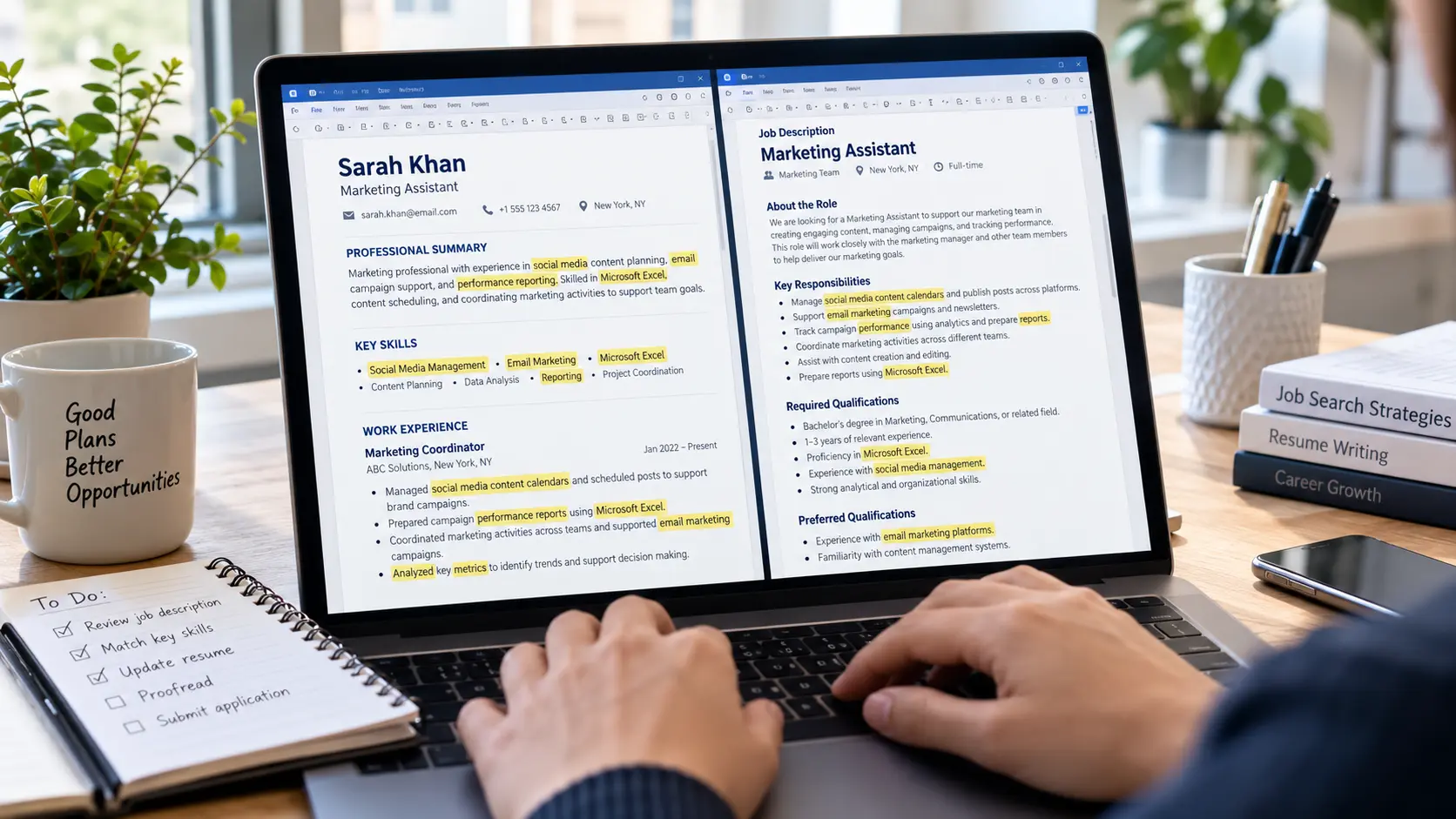
As a part of my job-sourcing and application assistance services, I use this practice to assess job opportunities, compare the requirements to my client’s resume, and recognize what skills deserve more attention before the application is submitted. It helps narrow the search down to the most relevant opportunities and present the information on the candidate’s experience in an accessible way, instead of adding skills or qualifications that they don’t have.
In this guide, I will walk you through how to analyze the job description, recognize relevant ATS keywords, tailor your resume, and review it using a practical example.
How to Match Resume to Job Description
Matching your resume to a job description means aligning your current skills, experience, qualifications, achievements, and keywords with the requirements of the position.
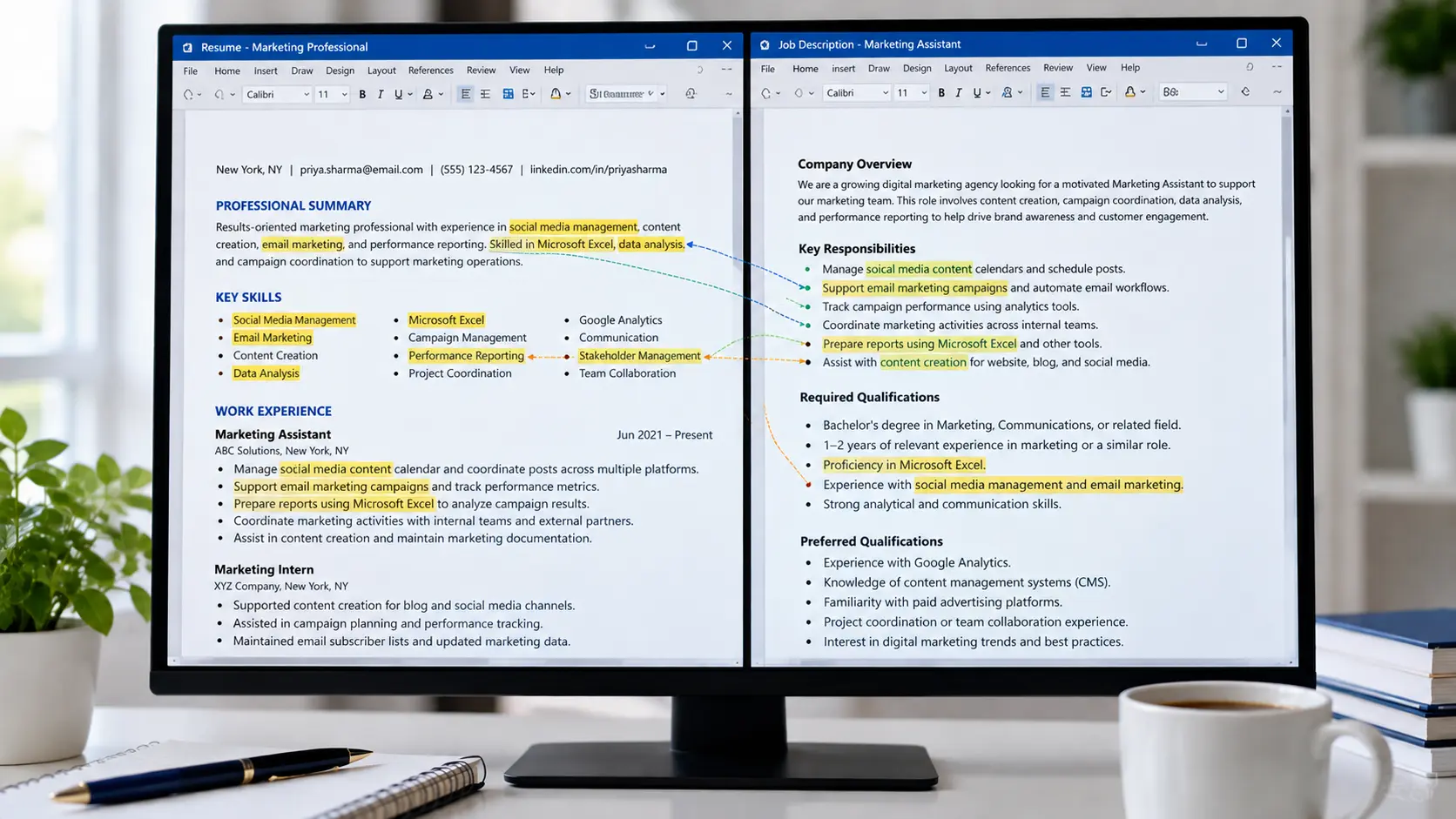
For instance, if the company is looking for a Data Analyst with experience in SQL, Excel, data visualization, and reporting, but the candidate only recognizes some of these responsibilities and tools as relevant to the post in question, the recruiter may not see them as a good fit for the role simply because they are not properly highlighted in the application materials.
Tailoring your resume ensures that your qualifications are properly aligned to the requirements of the post, and it is also referred to as resume optimization and job-description matching.
What Is an Applicant Tracking System (ATS)?
An applicant tracking system or ATS, for short, is software that employers use to collect and organize applications.
Depending on the employer, it can be used for screening, resume parsing, candidate selection, and other stages of the recruitment process. Some companies use specific criteria or tools within the system to narrow down their search, while others may use it for administrative purposes only.
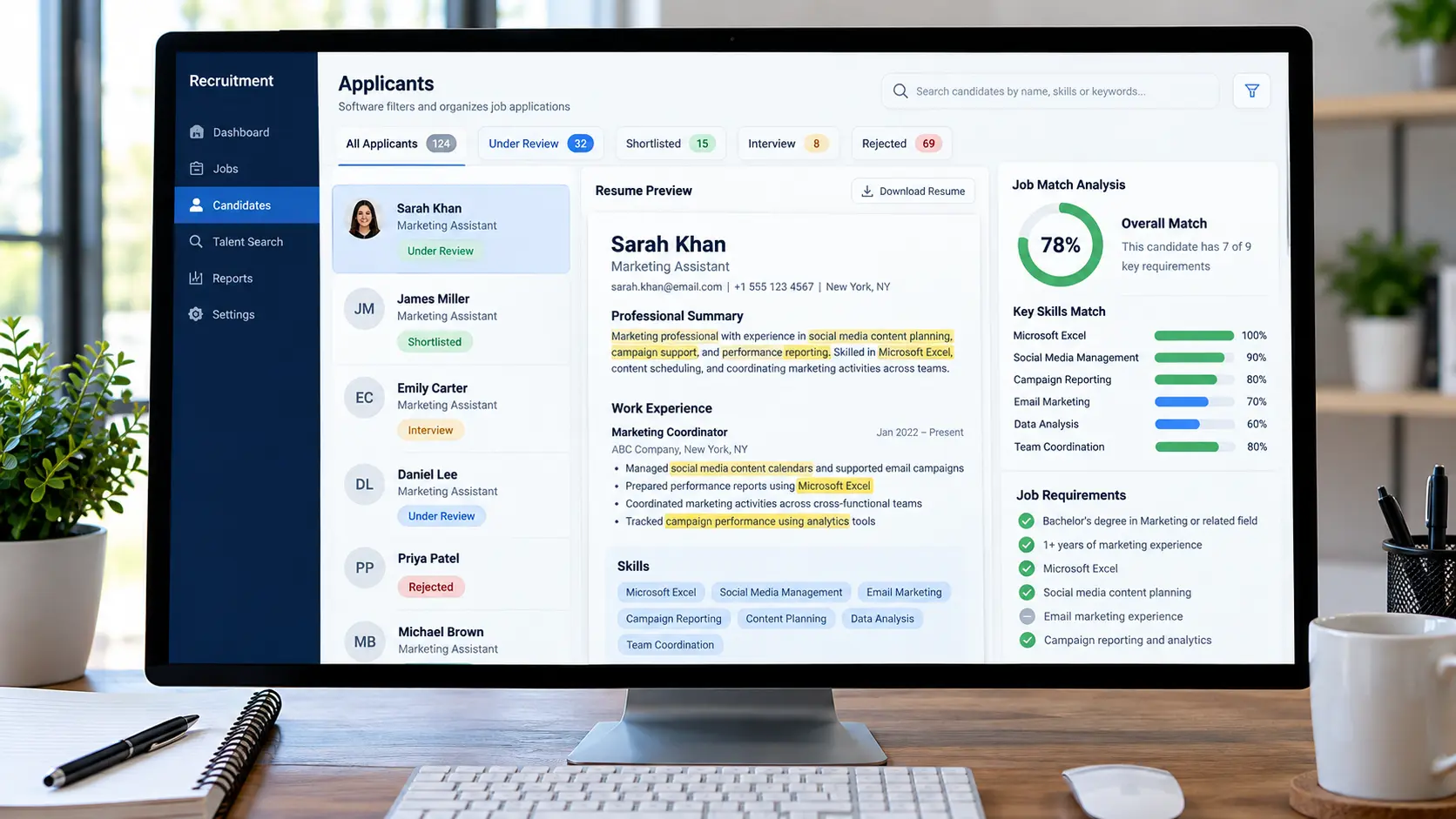
There is no universal ATS score, since the process and tools may vary depending on the employer. Instead, focus on creating an ATS-friendly resume that is easy to read and understand while emphasizing relevant keywords and qualifications for the post in question.
How to Match Resume to Job Description
Step 1: Read the Job Description Before Editing Your Resume
Before making any edits to your resume, spend some time reviewing the job description in its entirety.
Do not limit yourself to the job title and responsibilities outlined in the first paragraphs, as the core requirements, qualifications, and keywords can appear anywhere in the document.
Below are some of the elements that you should pay attention to when analyzing the job post:
- Responsibilities: What will the successful candidate be doing on a regular basis?
- Qualifications: What skills, education, certifications, or other qualifications are required and recommended for the job?
- Technical skills: Are there any software, tools, or platforms that the candidate should be experienced with?
- Preferred qualifications: Are there any additional skills, certifications, or qualifications that would be beneficial for the candidate to have?
- Expected outcomes: What problems is the candidate expected to solve or what outcomes are they supposed to contribute to?
It is also vital to differentiate between required and optional qualifications, since it can help you understand whether the opportunity is a good fit before you proceed to tailor your resume.
Example
If you are applying for the position of a Marketing Assistant with the following requirements:
- Managing social media content calendars.
- Assisting with email marketing.
- Reviewing campaign performance statistics.
- Coordinating marketing efforts.
- Preparing reports in Microsoft Excel.
You should first go through these responsibilities and recognize the ones that you have experience with. If you have been managing social media accounts and creating reports in Excel, you can highlight these skills on your resume, while you should avoid claiming to have experience with email marketing if you have none.
Step 2: Identify the Most Relevant Resume Keywords
Resume keywords are terms and phrases used within the job description to denote qualifications, skills, responsibilities, tools, experience, and other elements relevant to the post.
To identify resume keywords, look for the terms used to describe the qualifications, responsibilities, and tools within the job description. Try to recognize patterns, since repetitive terms and phrases can signal what the employer is looking for, although this is not always the case.
There are several keyword categories that you should be aware of, including:
| Keyword category | Examples |
| Job titles | Data Analyst, Project Manager, Marketing Assistant, etc. |
| Technical skills | SQL, Microsoft Excel, Python, Power BI |
| Professional skills | Data analysis, project coordination, stakeholder management |
| Tools and platforms | Salesforce, Jira, Google Analytics, HubSpot |
| Industry terminology | Quality assurance, customer acquisition, cloud infrastructure |
| Responsibilities | Reporting, troubleshooting, forecasting, campaign management |
| Qualifications | Bachelor’s degree, relevant certification, professional experience |
These are examples of common resume terminology, not a universal keyword list. The appropriate keywords depend on the specific job, industry, and candidate’s background.
How I Approach Keyword Matching
As a part of my job-sourcing and resume-matching services, I take the job description and the candidate’s resume and use them to identify relevant skills, experience, tools, and keywords. I then file them under three categories:
- Matching keywords: Skills, experience, and qualifications explicitly mentioned on the resume.
- Underrepresented keywords: Skills, experience, and qualifications that are relevant to the job but are not clearly stated on the resume.
- Missing qualifications: Skills, experience, and qualifications that are not present on the resume but are relevant to the job.
This helps both the candidate and me recognize which elements of the resume need more attention before the application is submitted.
It is also important to differentiate between skills and qualifications that are underrepresented and those the candidate does not possess, since the former can often be improved upon while the latter cannot always be remedied.
Step 3: Create a Resume-to-Job Description Comparison
Once you have recognized the relevant keywords, compare them with the information on your resume to create a list of relevant evidence.
A resume-to-job description comparison can be made in a number of ways, including by using a spreadsheet, a table, or simply bullet points and notes. Below is an example of how such a comparison can look.
| Job requirement | Evidence in resume | Action |
| Microsoft Excel | Prepared reports using Excel | Highlight in skills and experience |
| Data analysis | Analyzed sales performance data | Describe the analysis and its purpose |
| Dashboard reporting | No supporting evidence | Do not claim this skill |
| Stakeholder communication | Presented findings to team members | Highlight relevant communication experience |
This resume-to-job description comparison helps you visualize the information that you have, which can help both you and potential recruiters recognize the strengths and weaknesses of your application to a specific post. It also helps you understand if you can support a certain claim, since there is no point in claiming to have experience with spreadsheet software if there is no evidence of that on your resume.
For a simple ATS resume guide, you can make columns for the requirement, keyword, evidence, relevance, and required resume edits.
Step 4: Tailor Your Professional Summary
Your professional summary is often one of the most important sections of your resume since it summarizes your key qualifications and experience.
When tailoring your resume to a specific job description, you may want to revise the summary to better align with the requirements of the post. It is best to avoid using the same professional summary for every application, especially if the requirements of different posts differ significantly.
Before: Generic Summary
“Hardworking professional with excellent communication skills and a keen eye for detail. I also have experience working in a busy environment.”
This summary does not explain the candidate’s professional background or why the experience is relevant to a particular job.
After: Targeted Summary
“Marketing professional with experience in social media planning, report preparation, and campaign coordination. Proficient in Excel, content scheduling, and report organization.”
Why the revised version is stronger: The tailored summary is better aligned with the requirements of the post since it includes relevant skills and responsibilities. It also better explains the candidate’s experience, compared with the simple summary that only mentions working in a busy environment without providing specifics.
This is just an example, since the revised summary should only be used if the candidate actually possesses the mentioned skills and qualifications.
Step 5: Rewrite Resume Bullet Points Using Relevant Keywords
Many candidates make the mistake of listing their responsibilities when creating resume bullet points. However, a good bullet point should explain what you did, which skills and tools you used, and what you achieved.
When tailoring your resume, keep your original message intact but revise it to better align with the job requirements. Below are some examples of properly revised resume bullet points.
Example 1: Project Coordination
Original bullet point: “Helped the team with various project-related tasks and updated project documentation.”
Tailored bullet point: “Coordinated project documentation, reported on project-related tasks, and updated communication to ensure that the team stayed on track.”
Relevant keywords: project coordination, communication, project documentation.
Example 2: Data Analysis
Original bullet point: “Worked with spreadsheets and prepared reports.”
Tailored bullet point: “Prepared and maintained Excel reports to organize and store data for regular performance reporting.”
Relevant keywords: Microsoft Excel, reporting, operational data, and performance reporting.
Example 3: Customer Support
Original bullet point: “Answered customer questions and helped solve problems.”
Tailored bullet point: “Responded to customer inquiries, documented issues, and coordinated follow-up actions to support timely resolution.”
Relevant keywords: customer inquiries, issue documentation, follow-up, and problem resolution.
You can use these examples as a reference when tailoring your resume bullet points to a specific job description. Keep the original information intact and only add relevant keywords to better align with the requirements of the post. Do not embellish achievements or invent responsibilities and accomplishments.
Step 6: Apply Relevant Keywords Throughout the Document
Once you have compiled a list of relevant keywords, you can add them to your resume in places where they make sense.
Depending on your resume style, you can include them in:
- Your professional summary or summary of qualifications.
- Your resume skills or core competencies section.
- Your work experience bullet points.
- Your relevant projects, certifications, and education.
- Other applicable sections.
For example, if the job description explicitly asks for “stakeholder management” experience and the candidate has been coordinating requirements and updates for stakeholders, they can include this phrase in their resume to better align with the requirements of the post.
However, if the candidate only has experience communicating with people in general, it is best to avoid using this phrase since it would not accurately represent their skills and experience. It is also important to avoid adding irrelevant keywords simply to improve your chances with the ATS, since it can actually hurt your application.
Step 7: Make Sure Your Resume Is ATS-Friendly
It is important to optimize your resume in accordance with ATS guidelines, since this can help recruiters recognize and read your application more easily.
However, optimization should not sacrifice readability. Below are some general resume guidelines that can help you optimize your resume for ATS without sacrificing its overall quality.
- Keep the resume design simple. If possible, avoid using columns since they can be misread by ATS readers.
- Use standard resume sections, such as the professional summary, skills, work experience, and education.
- Use standard fonts, such as Arial or Calibri.
- Make sure that job titles, employers’ names, and locations are easy to read and spelled correctly.
- Use standard bullet point formatting and date formats throughout the resume.
- Do not include contact information in the header or footer.
- Avoid using complex tables, graphics, text boxes, and other non-standard elements.
- Save the resume in the file type that the employer requested (mostly PDF or .DOCX if no format is specified).
- Check that the text remains readable when copied from the saved document.
It is also vital to make sure that the text is readable when copied from the saved file, since it may not work for all ATS readers. If you are unsure, double-check the file before submitting your application. There is no one-size-fits-all resume format, so follow the instructions provided by the employer and review your resume before submitting it.
Step 8: Use ChatGPT to Compare Your Resume to a Job Description
ChatGPT and other similar tools can be used to compare your resume to a job description and identify relevant keywords, suggestions, and edits. Use them as supplementary tools, since they may not fully understand the context of the resume or the candidate’s experience.
Below is an example of a prompt that you could use:
“Compare the resume to the job description. Identify the keywords, skills, qualifications, responsibilities, and other elements that are relevant to the post in question. Create a comparison table that includes the elements that are supported by the resume, as well as the ones that could benefit from additional attention. Provide suggestions for the professional summary and resume bullet points, making sure to focus on the qualifications, skills, and experience that are relevant to the job. Avoid suggesting any specific achievements, tools, or responsibilities that are not mentioned on the resume. Clearly note the elements that should be revised but cannot be improved without additional information from the candidate.”
Once you have reviewed the suggestions, double-check everything:
- Make sure that no keywords were suggested that are not relevant to your experience, and that the revised bullet points properly convey your intended meaning.
- Reject unsupported skills or achievements.
- Make sure the summary, skills, and other sections of your resume are properly worded and free of grammatical errors.
- Check grammar and readability.
- Ensure that the final version of your resume accurately reflects your work experience and qualifications.
AI can help speed up the review, but the candidate remains responsible for the accuracy of the final application.
Step 9: Review Your Resume Before Submitting the Application
Before you submit your resume, make sure that it follows the guidelines and recommendations that have been suggested.
Below is a list of final resume-checking tips that you should go over before submitting the application.
- The resume reflects the job title that you are applying for.
- The resume includes the relevant qualifications that have been identified.
- The resume keywords are used throughout the document in appropriate contexts.
- The professional summary emphasizes the relevant qualifications and experience.
- The resume includes specific accomplishments and responsibilities for the relevant job experience.
- The resume skills, projects, certifications, and education are free of errors.
- The resume uses standard sections and formatting.
- The resume adheres to the file-type instructions that the employer provided.
- The resume has been proofread and does not have typos, grammar issues, or formatting errors.
- The resume file has been saved with an appropriate, recognizable name.
As a rule of thumb, always keep your master resume file with all of your work history on it. You should update it regularly and use it as a base for every resume that you submit. It will make the process of tailoring your resume easier since you will be able to update only the relevant information without having to redo your entire resume every time.
Resume Matching Mistakes to Avoid
1. Sending the Same Resume to Every Employer
A generic resume may not always reflect the specific requirements of the job, so it is best to tailor it to better align with the requirements of the post.
Resume Matching Mistakes to Avoid
1. Sending the Same Resume to Every Employer
A generic resume may not always reflect the specific requirements of the job, so it is best to tailor it to better align with the requirements of the post.
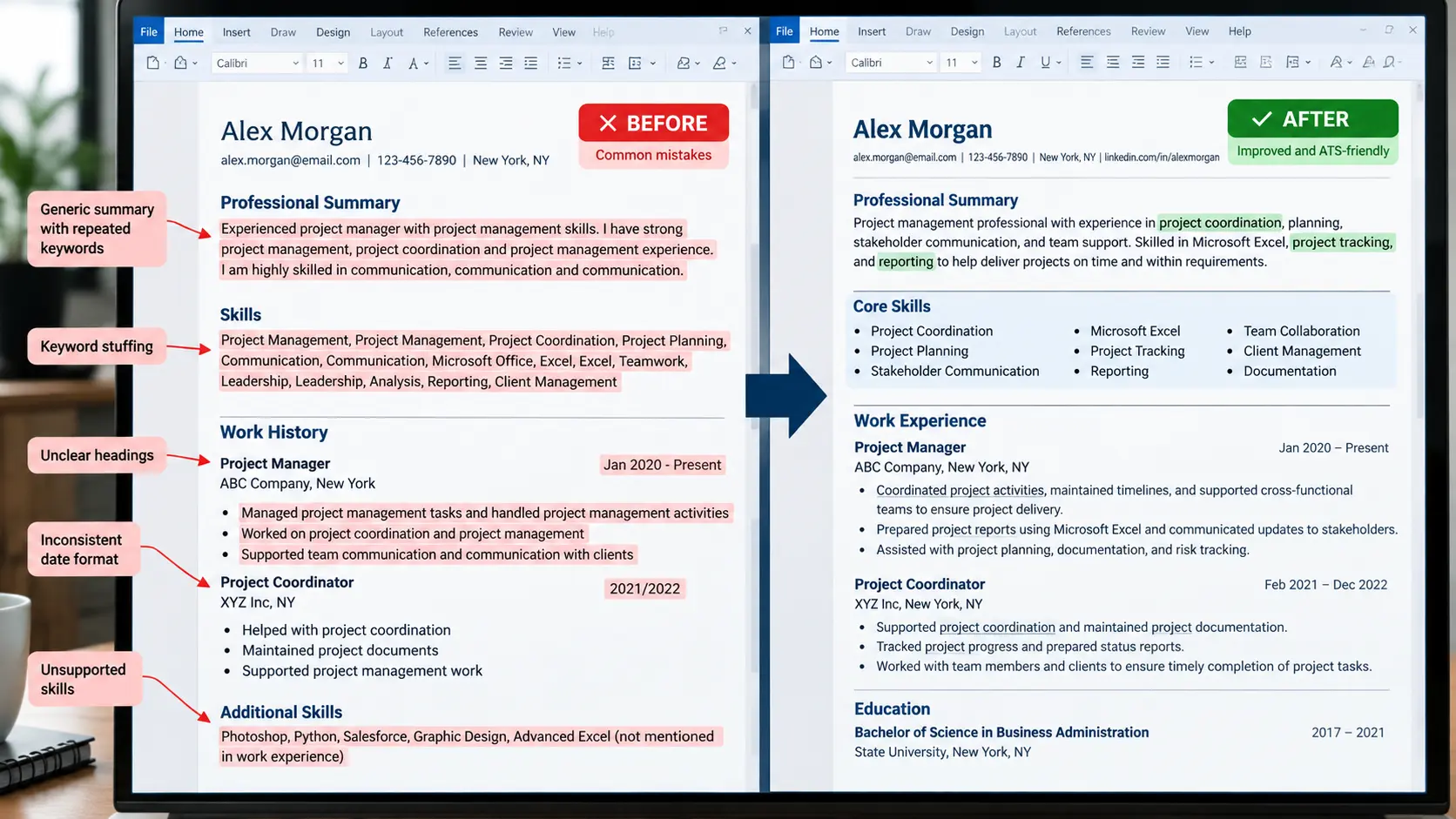
2. Adding Unnecessary Keywords or Embellishing Your Experience
You should only use keywords and qualifications that accurately reflect your experience since claims that are too specific or detailed can be identified as false by a recruiter.
3. Focusing Only on the ATS
An ATS-friendly resume should be easy to read and follow standard formatting instructions. It still needs to look good and have a proper structure even if it has been optimized for the ATS reader.
4. Relying Solely on Resume-Matching Software and Forgetting to Review Your Resume
ATS resume scanners can be helpful, but they should not replace human analysis entirely. A resume that has been optimized for an ATS reader still needs to be reviewed for readability, quality, and accuracy.
5. Forgetting to Check the Final Document
No matter how many automated checks you perform, it is always a good idea to double-check the final version of your resume before submitting the application.
Final Notes
Matching your resume to a job description is about emphasizing your relevant qualifications so that they are easy to find and understand. To do that, recognize the qualifications and keywords that the employer is looking for, and adjust your resume summary and bullet points accordingly.
In my practice of resume assistance and job sourcing, I use this method to assess the relevance of a job opportunity, identify the relevant qualifications that the candidate has, and suggest edits to their resume so that their experience and skills are easy to comprehend. I recommend following the resume optimization steps outlined in this guide for every application that you submit, since it helps ensure that your resume is aligned with the requirements of the post in question.
Remember: The goal is not to make your resume contain every keyword that can be found in the job description. The objective is to ensure that your qualifications, skills, and experience accurately reflect what the employer is looking for.