Creating a resume takes time, especially when you are applying for several jobs that require different skills and experience. An online resume builder can simplify the process by offering professional templates, editing tools, keyword optimization features, and cover letter assistance. However, not every tool provides the features you need.
Choosing the right resume builder means looking beyond attractive templates. You also need to consider how easily you can customize your resume, download your documents, manage costs, and protect your personal information.
In my work as a Job Application Specialist, I have used Resume.io for keyword optimization and tailoring resumes and cover letters to specific job descriptions. This experience has taught me that a useful resume builder should make editing easier while allowing you to present a candidate’s qualifications accurately. A visually appealing document is helpful, but the content must remain relevant to the job.
In this guide, I will explain seven things to check before choosing an online resume builder, along with practical tips to help you make an informed decision.
Why Choosing the Right Online Resume Builder Matters
An online resume builder can help you organize your professional experience, education, skills, and achievements into a well-structured document. Depending on the platform, you may also get cover letter templates, writing suggestions, and options to download your resume in different formats.
However, a well-designed resume does not automatically make someone a strong candidate for a particular role. The content must demonstrate how their qualifications and experience relate to the employer’s requirements.
For example, a Data Analyst resume might need to highlight Excel, SQL, and reporting experience. A Project Manager resume, on the other hand, may need to emphasize project planning, risk management, and stakeholder communication.
The right resume builder should make it easier to highlight these relevant qualifications without compromising accuracy or readability.
7 Things to Look for in an Online Resume Builder
1. Choose ATS-Friendly Resume Templates
The first thing to check is the quality and structure of the available resume templates.
Many employers use applicant tracking systems (ATS) to collect, organize, and search job applications. Depending on the system and recruitment process, an ATS may help recruiters identify applications containing relevant qualifications and experience.
A resume builder with simple, well-structured templates can make your information easier to read and help reduce potential formatting problems.
When comparing templates, look for:
- Clear section headings, such as Work Experience, Education, and Skills.
- Readable fonts and consistent spacing.
- A logical order for your professional information.
- Simple layouts without unnecessary decorative elements.
- Enough flexibility to highlight relevant skills and achievements.
- Download options that meet the employer’s application requirements.
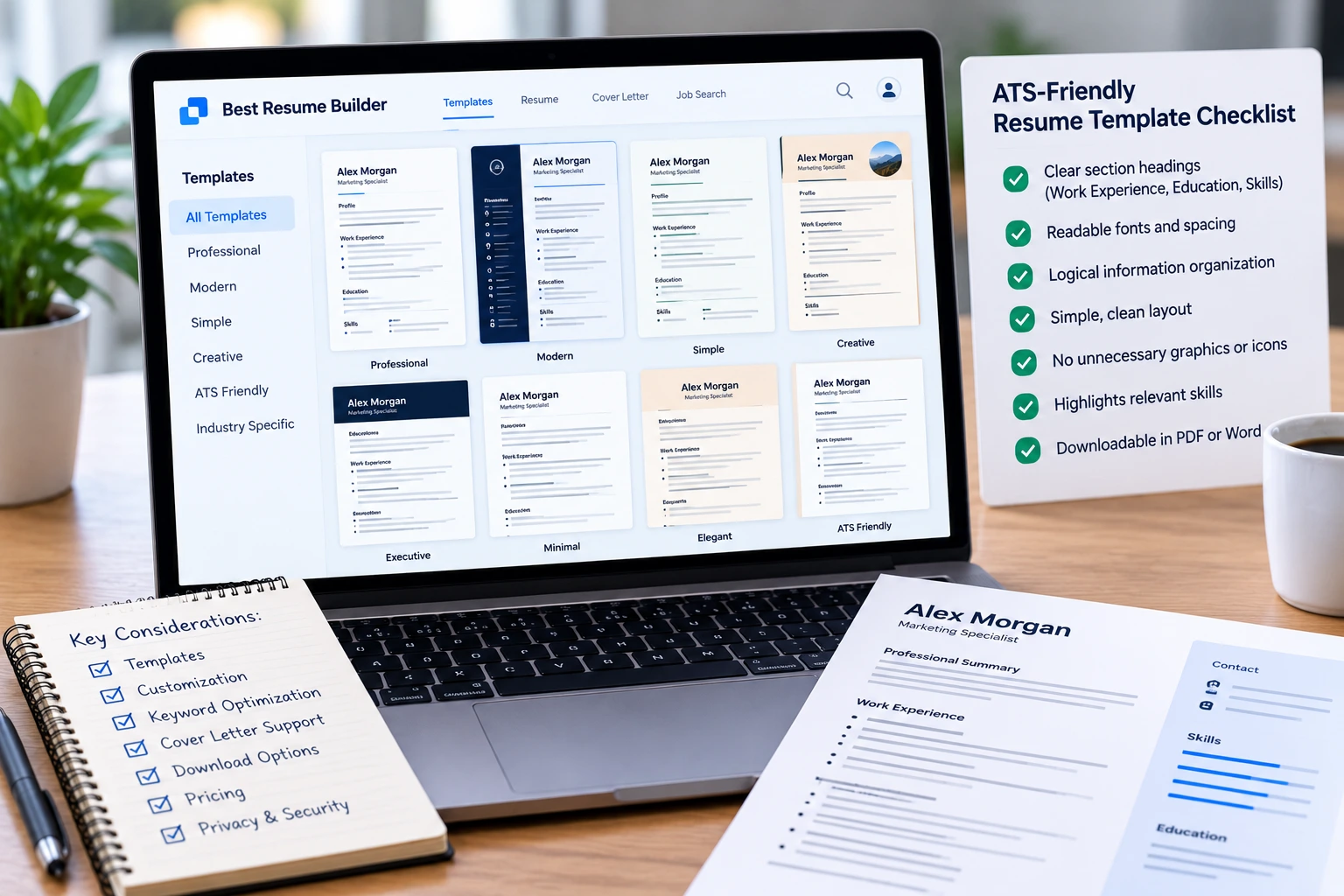
Some resume builders offer highly visual templates with graphics, columns, and icons. These designs may look appealing, but they are not always the best choice for every application.
My practical tip: Do not rely only on the resume builder’s preview. Download the finished document and check that your employment dates, bullet points, headings, and contact details appear correctly. When possible, review the extracted text as well as the visual layout.
When I tailor resumes to job descriptions, I prioritize the candidate’s relevant experience and the employer’s requirements before selecting a design. The template should support the content, not distract the recruiter from it.
2. Check for Keyword Optimization Features
Keyword optimization is another important feature to consider when choosing a resume builder.
Job descriptions often mention specific technical skills, qualifications, tools, and responsibilities. Reviewing these requirements can help you identify which parts of your experience deserve more attention in your resume.
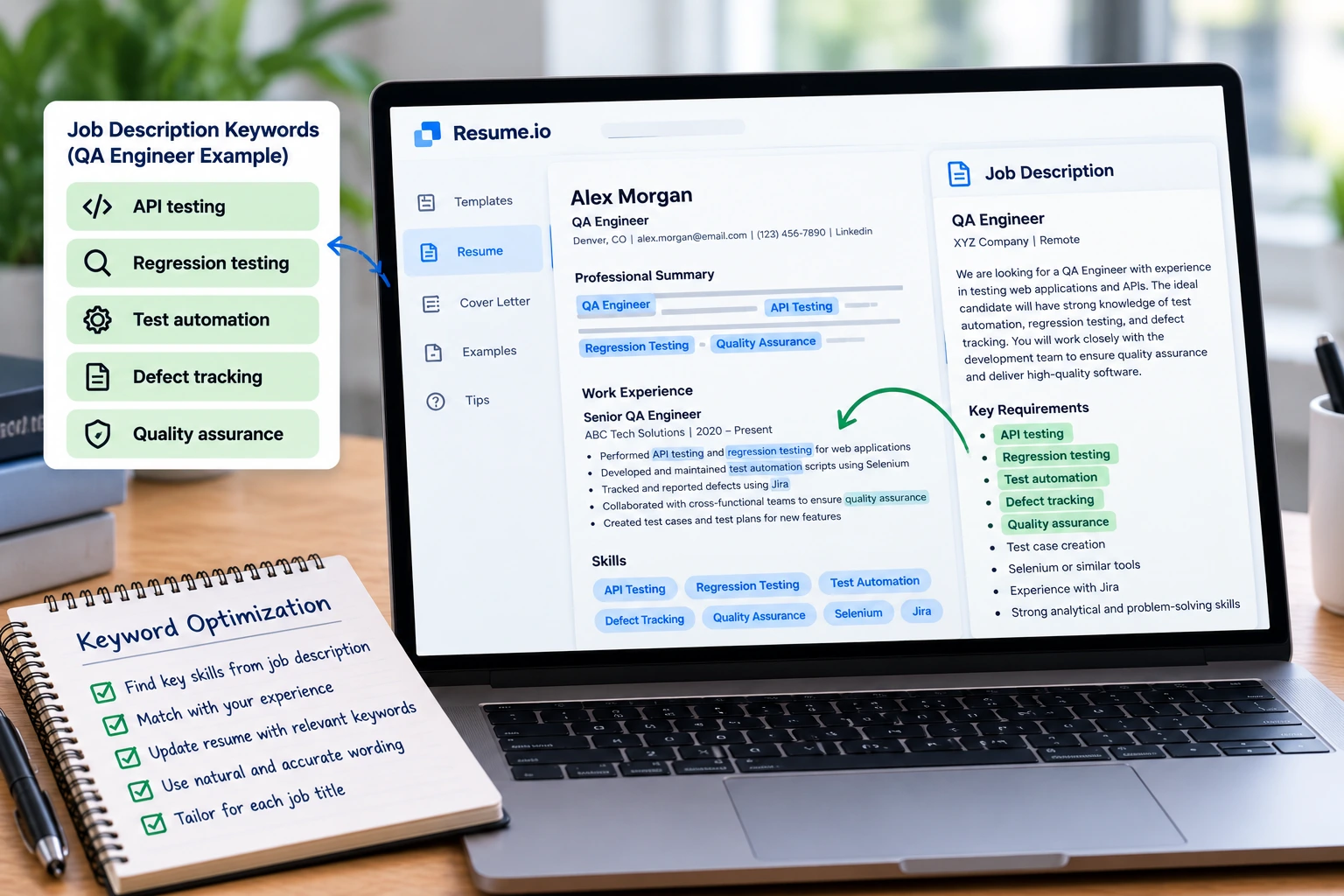
For example, a QA Engineer vacancy might mention:
- API testing
- Regression testing
- Test automation
- Defect tracking
- Quality assurance
If the candidate has relevant experience in these areas, the resume should explain that experience clearly. Relevant keywords can help recruiters locate important qualifications, but they should always reflect the candidate’s actual skills and background.
How I use Resume.io for keyword optimization
In my work as a Job Application Specialist, I have used Resume.io to optimize resume keywords and tailor resumes and cover letters to specific job descriptions.
My process starts with reviewing the vacancy to identify its main requirements. I then compare those requirements with the candidate’s existing experience, skills, and achievements. This helps me determine which details to emphasize and where the resume may need clearer wording.
For example, if a job description emphasizes regression testing and defect tracking, I look for relevant examples in the candidate’s experience and make those details easier to identify.
The goal is not to copy the entire job description into the resume. It is to present the candidate’s genuine qualifications using relevant language that aligns with the role.
Questions to ask about keyword optimization
Before choosing a resume builder, check whether it allows you to:
- Add and edit relevant skills and experience.
- Customize your resume for different job titles.
- Review and change suggested content.
- Control the wording of your professional summary and bullet points.
- Save different versions for different applications.
Some platforms offer writing suggestions or keyword-related features, while others mainly provide templates and formatting tools. Check which features are included in the plan you intend to use.
Remember that keyword optimization does not guarantee that a resume will pass an ATS screening or lead to an interview. Its purpose is to help present relevant qualifications clearly and make the document more closely aligned with the vacancy.
3. Look for Flexible Resume Customization
A resume that works well for one job may not be the best fit for another. That is why customization is essential.
A good resume builder should let you edit the content easily instead of forcing you to use the same wording and structure for every application.
Look for options that allow you to:
- Edit your professional summary and work experience.
- Add, remove, or rearrange sections.
- Update skills and achievements.
- Change headings and personal details.
- Switch between templates when necessary.
- Save or create separate resume versions.
Consider a candidate applying for both Business Analyst and Project Coordinator positions. For the Business Analyst role, the resume might emphasize requirements analysis, documentation, reporting, and data analysis. For the Project Coordinator role, it might give more attention to scheduling, project planning, and stakeholder communication.
The candidate’s underlying experience remains the same, but the most relevant details may need to be presented differently.
My recommendation: Keep an accurate master resume containing your complete work history, skills, and achievements. Then create tailored versions for suitable vacancies. This makes it easier to customize each application without losing track of your original information.
4. Check Whether It Includes a Cover Letter Builder
A resume summarizes your professional background, while a cover letter gives you an opportunity to explain why your experience is relevant to a particular position.
Some online resume builders also include cover letter tools. Having both documents available through one platform can make it easier to maintain consistent formatting and update them together.
Before choosing a tool, check whether it offers:
- Editable cover letter templates.
- Options to personalize the letter for a specific employer and role.
- Formatting that complements your resume.
- Editable writing suggestions.
- Downloadable cover letters.
- Clear information about whether these features require a paid subscription.
I have also used Resume.io to tailor cover letters to specific job descriptions. My approach is to identify the employer’s priorities and connect them with examples from the candidate’s actual experience.
For instance, if a vacancy emphasizes customer service, a cover letter could briefly describe a relevant situation in which the candidate demonstrated strong customer service skills.
The cover letter should complement the resume rather than simply repeat it. Use it to explain relevant strengths, provide context, and show why the candidate’s background fits the position.
5. Compare Pricing, Free Features, and Subscription Terms
Before paying for a resume builder, check exactly what you can do with the free version.
Some platforms allow users to create a resume but restrict certain templates, downloads, or editing features to paid plans. Others offer trials that automatically renew unless the user cancels according to the stated terms.
The most expensive tool is not necessarily the best choice. If you only need a basic resume and apply for a small number of positions, a free option may be sufficient. If you regularly tailor resumes and cover letters for different vacancies, additional editing and document-management features may be more useful.
Compare these details before subscribing:
- Cost of creating and downloading a resume.
- Availability of free templates.
- Cover letter creation and download options.
- Number of resumes or versions you can create.
- Access to keyword optimization and writing assistance.
- Subscription renewal and cancellation terms.
- Supported download formats.
- Availability of customer support.
Is Resume.io worth considering?
I have used Resume.io for resume keyword optimization and tailoring resumes and cover letters. It can be worth considering if you prefer a guided resume-building process and want to prepare customized documents for different job applications.
However, the value depends on your needs and the features available under your subscription. Resume.io‘s official help center explains its free and paid options, including differences in available templates and document downloads. Features, prices, and terms can vary, so check the current details directly before subscribing.
You should also read the trial and renewal conditions carefully. According to Resume.io‘s published help documentation, its seven-day trial renews into a paid subscription if the user does not cancel within the trial period. Confirm the current terms before entering payment information.
The key is to pay for features you will actually use rather than choosing a subscription simply because it offers more options.
6. Check Download Formats and Final Document Quality
A resume builder may look excellent in your browser, but the downloaded document is what you will usually submit to an employer.
Before choosing a platform, confirm that it supports the file formats required for your applications. PDF and Word documents are common, but you should always follow the employer’s instructions.
Check the following:
- Whether PDF and Word downloads are available.
- Whether downloads are restricted to a paid plan.
- Whether the downloaded file preserves the intended layout.
- Whether the text remains readable and selectable.
- Whether you can edit the document after downloading.
- Whether the file can be saved locally for future use.
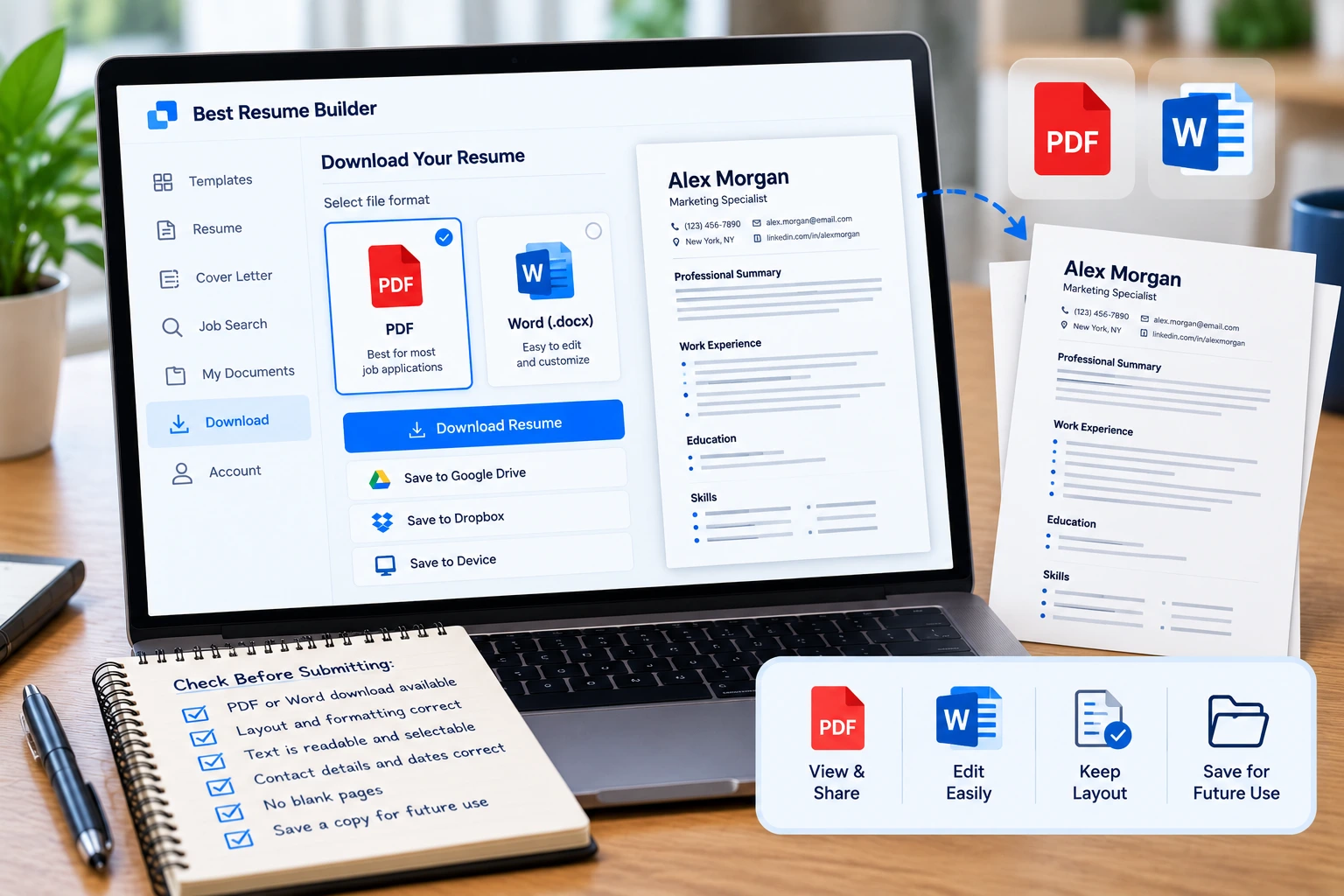
After downloading your resume, review it carefully. Check that your contact information, employment dates, headings, bullet points, and qualifications are correct. Look for unexpected page breaks, blank pages, missing text, or inconsistent spacing.
If you plan to make further changes, confirm that the file format supports your editing needs. You should also keep a copy of the final version so that you can reuse or update it later.
Practical tip: Always follow the file-format instructions in the job advertisement or application portal. A resume builder’s preferred format does not override the employer’s requirements.
7. Review Privacy and Data Protection
An online resume builder may collect personal information, including your name, email address, phone number, employment history, and education. Some platforms also store the documents you create.
Before uploading your information, review the platform’s privacy policy to understand how your data is collected, stored, used, and shared.
Look for clear information about:
- What personal information the company collects.
- How uploaded resumes and cover letters are stored.
- Whether information is shared with third parties.
- How long your data is retained.
- Whether you can delete your documents and account.
- How the company handles privacy-related requests.
Avoid including unnecessary sensitive information in your resume or uploading it to a platform without understanding how the information may be used. For example, do not add your Social Security number, bank details, passwords, or other private information unless there is a legitimate, verified reason to provide it through an appropriate secure process.
You should also use a strong, unique password if the platform requires an account and be cautious about uploading documents to unfamiliar websites.
Protecting your information is just as important as creating a professional-looking resume.
Online Resume Builder Checklist
Use this checklist to compare different resume builders before making a decision.
| Feature | What to look for |
|---|---|
| ATS-friendly templates | Clear headings, readable text, and simple formatting |
| Keyword optimization | The ability to edit skills and emphasize relevant experience |
| Customization | Flexible editing and separate versions for different roles |
| Cover letter builder | Editable, downloadable letters that can be tailored to each vacancy |
| Pricing | Clear free-plan limits, subscription fees, and renewal terms |
| Download formats | PDF or Word options that meet employer requirements |
| Document quality | Correct spacing, dates, headings, and page layout |
| Privacy | Clear policies for data collection, storage, and deletion |
You do not necessarily need every feature on this list. Choose a tool that covers your essential requirements, fits your budget, and gives you control over the final documents.
Common Mistakes to Avoid When Choosing a Resume Builder
Choosing a tool based only on its templates
An attractive design is useful only if the resume remains readable and presents relevant qualifications clearly. Compare the content-editing features and document quality, not just the appearance.
Assuming an ATS score guarantees an interview
Some platforms provide resume scans or scores. These can help identify potential issues, but they cannot guarantee that an employer’s ATS will rank your application highly or that a recruiter will invite you to an interview.
Paying before checking the free version
Test the available features first. Make sure you understand which templates, editing options, and downloads are included before committing to a subscription.
Accepting every writing suggestion without reviewing it
Automated suggestions can be useful starting points, but they may introduce inaccurate claims or generic language. Review every change and ensure that it reflects the candidate’s real experience.
Using the same resume for every vacancy
Different roles may prioritize different skills and responsibilities. Tailor your resume to each suitable vacancy while keeping all information accurate.
Forgetting to review the downloaded document
Do not assume that a perfect preview means a perfect file. Check the downloaded document before submitting it to an employer.
Final Thoughts: How to Choose the Right Resume Builder
The right online resume builder should make it easier to create a clear, relevant, and well-structured resume. Before choosing one, consider its templates, keyword optimization features, customization options, cover letter tools, pricing, download formats, and privacy policy.
In my work as a resume writer, I have used Resume.io to optimize keywords and tailor resumes and cover letters to specific job descriptions. My approach is to identify the overlap between the employer’s requirements and the candidate’s actual qualifications, then present that information clearly and accurately.
A resume builder can support this process, but it cannot replace careful job-description analysis or an honest review of the candidate’s experience. The most useful tool is one that helps you create tailored applications without making the process unnecessarily complicated or expensive.
At Career Group 360, our goal is to help job seekers make informed decisions, highlight their strengths, and manage their job searches more effectively. Choose a resume builder that supports your needs, review every document before submitting it, and focus on the quality and relevance of each application.